v1.1.0 — Open Source
Your notes.
One place.
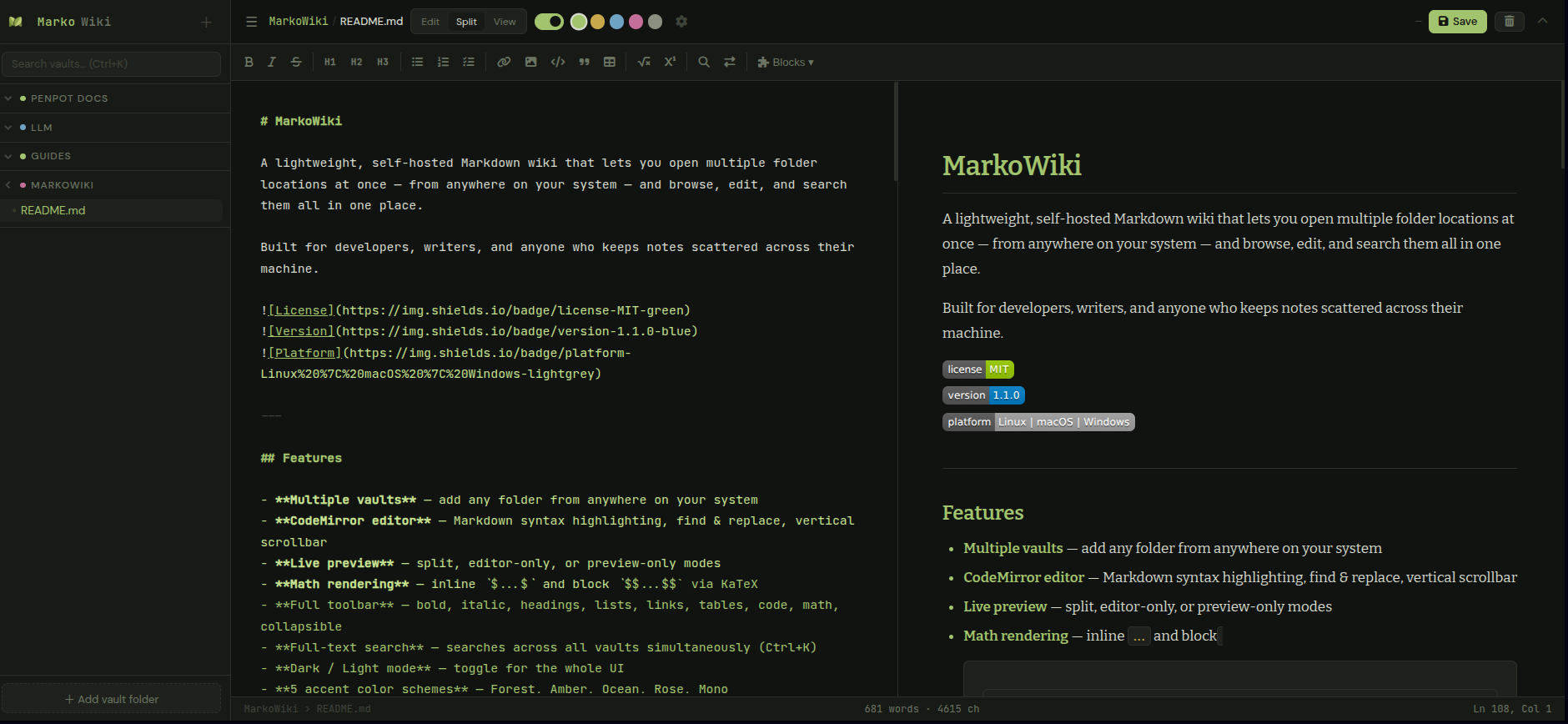
MarkoWiki is a lightweight, self-hosted Markdown wiki that lets you open multiple folders from anywhere on your system and browse, edit, and search them all in one place.
Features
Everything you need.
Nothing you don't.
Built for developers, writers, and anyone who keeps notes scattered across their machine.
Multiple Vaults
Add any folder from anywhere on your system. Open your OS docs, dev notes, and project docs all at once.
CodeMirror Editor
Full Markdown syntax highlighting, find & replace, and a native scrollbar — all styled to match your chosen theme.
Live Preview
Split, editor-only, or preview-only modes. See your Markdown rendered in real time as you type.
Math Rendering
Inline $...$ and block $$...$$ math via KaTeX. Perfect for technical notes.
Full-text Search
Search across all your vaults simultaneously. Instant results with context snippets.
Themes & Accents
Dark and light mode with 5 accent color schemes — Forest, Amber, Ocean, Rose, and Mono.
Custom Blocks
Define reusable Markdown templates with smart placeholders — auto-generated values, pick lists, or free text filled inline.
Auto-save
Enable auto-save with a configurable delay. Your work is saved silently while you focus on writing.
Single Binary
No installation. No dependencies. No Python, no Node.js. Just download and run. Works on Linux, macOS, and Windows.
Custom Blocks
Templates that work
the way you think.
Define reusable Markdown templates once. Insert them anywhere — placeholders fill automatically or inline.
| Syntax | Type | Behavior |
|---|---|---|
| {title} | Free text | Highlighted mark — click and type to replace |
| {status:A,B,C} | Pick list | Click the mark → choose from your options |
| {date} | Auto | Filled instantly on insert |
| {time} | Auto | Current time on insert |
| {datetime} | Auto | Full timestamp on insert |
## {title} — {date}
Status: {status:Draft,In Progress,Done}
Author: {author}
---
Status: {status:Draft,In Progress,Done}
Author: {author}
---
How it works
Up and running
in 30 seconds.
Download the binary
Pick the file for your platform from the GitHub releases page. No installer needed.
Run it
Double-click on Windows, or run ./markowiki-linux in your terminal. That's it.
Add your folders
Click "+ Add vault folder" and point it at any folder on your machine. Add as many as you want.
Start writing
Browse your files in the sidebar, click to open, edit with live preview. Your files stay exactly where they are.
Block Templates
Your templates.
Your way.
Define reusable Markdown templates once. Insert them anywhere with smart placeholders that fill themselves.
Meeting Note
## {title} — {date}
**Status:** {status:Draft,In Progress,Done}
**Author:** {author}
Callout Box
> **{type:Note,Warning,Tip}:**
> {message}
Dated Signature
---
*Written by {name} · {datetime}*
Review Header
### Review: {subject}
**Verdict:** {verdict:Approved,Rejected,Pending}
**Date:** {date}
{free} — click mark, type to replace
{pick:A,B,C} — click mark, choose option
{date} {time} {datetime} — filled on insert
Download
Free. Forever.
Open Source.
MIT licensed. Use it, modify it, share it. No accounts, no subscriptions, no telemetry.
Keyboard Shortcuts
Built for
keyboard people.
Save file Ctrl+S
Search vaults Ctrl+K
Toggle sidebar Ctrl+\
Find in editor Ctrl+F
Find & Replace Ctrl+H
Bold Ctrl+B
Italic Ctrl+I
Insert link Ctrl+L
Quick search /
Ready to organize your notes?
Free, open source, and runs entirely on your machine. Your files never leave your computer.